Welcome to aicspylibczi’s documentation!
aicspylibczi


Python module to expose libCZI functionality for reading (subset of) Zeiss CZI files and meta-data. We only support 64bit architectures currently if you desperately need 32 bit support please make an issue or modify the source and build it for your use case.
Usage
The first example show how to work with a standard CZI file (Single or Multi-Scene). The second example shows how to work with a Mosaic CZI file.
Example 1: Read in a czi and select a portion of the image to display
import numpy as np
from aicspylibczi import CziFile
from pathlib import Path
import matplotlib.pyplot as plt

pth = Path('20190610_S02-02.czi')
czi = CziFile(pth)

# Get the shape of the data, the coordinate pairs are (start index, size)
dimensions = czi.get_dims_shape()  # [{'X': (0, 1900), 'Y': (0, 1300), 'Z': (0, 60), 'C': (0, 4), 'S': (0, 40), 'B': (0, 1)}]

czi.dims  # BSCZYX

czi.size  # (1, 40, 4, 60, 1300, 1900)

# Load the image slice I want from the file
img, shp = czi.read_image(S=13, Z=16)


# shp = [('B', 1), ('S', 1), ('C', 4), ('Z', 1), ('Y', 1300), ('X', 1900)]  # List[(Dimension, size), ...]
# img.shape = (1, 1, 4, 1, 1300, 1900)   # numpy.ndarray

# define helper functions
def norm_by(x, min_, max_):
    norms = np.percentile(x, [min_, max_])
    i2 = np.clip((x - norms[0]) / (norms[1] - norms[0]), 0, 1)
    return i2


def recolor(im):  # transform from rgb to cyan-magenta-yellow
    im_shape = np.array(im.shape)
    color_transform = np.array([[1, 1, 0], [0, 1, 1], [1, 0, 1]]).T
    im_reshape = im.reshape([np.prod(im_shape[0:2]), im_shape[2]]).T
    im_recolored = np.matmul(color_transform.T, im_reshape).T
    im_shape[2] = 3
    im = im_recolored.reshape(im_shape)
    return im


# normalize, combine into RGB and transform to CMY
c1 = (norm_by(img[0, 0, 0, 0, 0:750, 250:1000], 50, 99.8) * 255).astype(np.uint8)
c2 = (norm_by(img[0, 0, 1, 0, 0:750, 250:1000], 50, 99.8) * 255).astype(np.uint8)
c3 = (norm_by(img[0, 0, 2, 0, 0:750, 250:1000], 0, 100) * 255).astype(np.uint8)
rgb = np.stack((c1, c2, c3), axis=2)
cmy = np.clip(recolor(rgb), 0, 255)

# plot using matplotlib
plt.figure(figsize=(10, 10))
plt.imshow(cmy)
plt.axis('off')
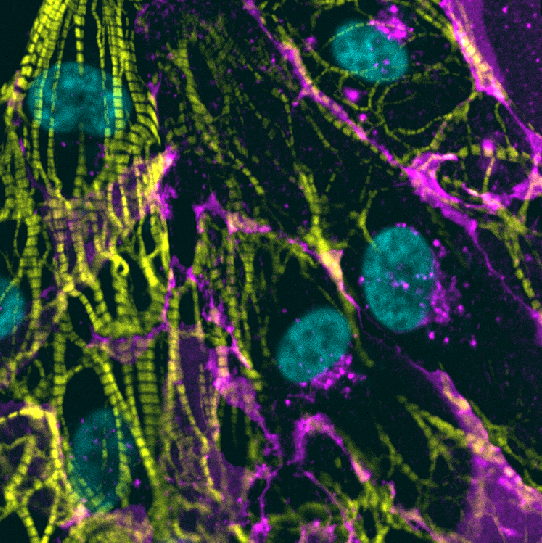
Example 2: Read in a mosaic file
import numpy as np
import aicspylibczi
import pathlib
from PIL import Image

mosaic_file = pathlib.Path('mosaic_test.czi')
czi = aicspylibczi.CziFile(mosaic_file)

# Get the shape of the data
dimensions = czi.dims  # 'STCZMYX'

czi.size  # (1, 1, 1, 1, 2, 624, 924)

czi.get_dims_shape()  # [{'X': (0, 924), 'Y': (0, 624), 'Z': (0, 1), 'C': (0, 1), 'T': (0, 1), 'M': (0, 2), 'S': (0, 1)}]

czi.is_mosaic()  # True
# Mosaic files ignore the S dimension and use an internal mIndex to reconstruct, the scale factor allows one to generate a manageable image
mosaic_data = czi.read_mosaic(C=0, scale_factor=1)

mosaic_data.shape  # (1, 1, 624, 1756)
# the C channel has been specified S & M are used internally for position so this is (T, Z, Y, X)

normed_mosaic_data = norm_by(mosaic_data[0, 0, :, :], 5, 98) * 255
img = Image.fromarray(normed_mosaic_data.astype(np.uint8))

Example 3: Read a czi from a remote URL
CziFile accepts http and https URLs in place of a path. Reads are served by libCZI’s
libcurl-backed stream, which fetches only the byte ranges it needs rather than downloading
the whole file, so tile and plane access stays cheap on large remote images.
from aicspylibczi import CziFile

czi = CziFile("https://example.com/data/mosaic_file.czi")

czi.dims  # 'BSCZYX'
img, shp = czi.read_image(S=0, C=0)
The server must support HTTP range requests. If it does not, libCZI cannot read the file.
On Linux, https servers are verified against the system CA bundle, found at runtime under
/etc/ssl or /etc/pki. Pass the ca_info stream option to use a different bundle.
macOS and Windows use the OS certificate store.
Pass stream_options to configure the underlying curl stream, for example to set a timeout
or send a bearer token to an authenticated endpoint:
czi = CziFile(
    "https://example.com/data/image.czi",
    stream_options={
        "timeout": 60,             # seconds for the whole transfer
        "connect_timeout": 10,     # seconds for the connection phase
        "xoauth2_bearer": token,   # OAuth2 access token
    },
)
Option names are libCZI’s stream properties. Both the full name (CurlHttp_Timeout) and its
short form (timeout) are accepted, case- and underscore-insensitively. The full set for your
installation is available programmatically:
import _aicspylibczi

_aicspylibczi.stream_option_names()
# ['CurlHttp_Proxy', 'CurlHttp_UserAgent', 'CurlHttp_Timeout', 'CurlHttp_ConnectTimeout',
#  'CurlHttp_Xoauth2Bearer', 'CurlHttp_Cookie', 'CurlHttp_SslVerifyPeer', 'CurlHttp_SslVerifyHost',
#  'CurlHttp_FollowLocation', 'CurlHttp_MaxRedirs', 'CurlHttp_CaInfo', 'CurlHttp_CaInfoBlob']
Remote reads depend on a build-time option, so a build made without the curl stream will reject URLs. Check before relying on it:
from aicspylibczi import remote_reads_available

remote_reads_available()  # True for the published wheels
Object stores that issue presigned URLs (S3, GCS, Azure Blob) work through the same path, since a presigned URL is just an authenticated https URL.
Installation
The preferred installation method is with pip install.
This will install the aicspylibczi python module and extension binaries (hosted on PyPI):
pip install aicspylibczi
If this doesn’t work: Please investigate the following (generally windows issues):
your OS is 64 bit - we only support 64 bit binaries
your python is a 64 bit application (not 32 bit)
are your C++ runtime libraries up to date? vc_redist.exe
If you have tried this and are still having trouble please reach out to us and we will endeavor to help.
Documentation
Documentation is available at github.io.
Build
Use these steps to build and install aicspylibczi locally:
Clone the repository including submodules (
--recurse-submodules).Requirements:
libCZI requires a c++11 compatible compiler. Built & Tested with clang.
Development requirements are those required for libCZI: libpng, zlib
libcurl is fetched and built automatically to support remote reads. On Linux it needs a TLS backend present at build time (openssl-devel / libssl-dev) or
httpsURLs will not work. macOS uses Secure Transport and Windows uses SChannel, neither of which needs anything installed.Install the package:
pip install .
pip install -e .[dev] # for development (-e means editable so changes take effect when made)
pip install .[all] # for everything including jupyter notebook to work with the Example_Usage above
libCZI is automatically built as a submodule and linked statically into aicspylibczi.
Note: If you get the message directly below on windows you need to set PYTHONHOME to be the folder the python.exe you are compiling against lives in.
EXEC : Fatal Python error : initfsencoding: unable to load the file system codec ...
ModuleNotFoundError: No module named 'encodings'
Known Issues
with read_mosaic if the scale_factor is not 1.0 Zeiss’s libCZI will, on some files, fail to render certain subblocks within the composite mosaic image. It is not currently known if this is an issue with the file or with libCZI.
History
aicspylibczi was originally a fork of pylibczi that was developed by Paul Watkins and focused on mSEM data. In attempting to extend the work to we transitioned to pybind11, implemented c++ and python tests, added continuous integration via github actions, and added the functionality to read individual subblocks and stacks of subblocks as a numpy.ndarray. Metadata reading, including specific subblock metadata reading has also been added.
We intend for this work to be merged back into the original project once we have the new work integrated with the original work.
Licenses & Acknowledgements
This project was created from a fork of pylibczi as explained above in the history section and Paul Watkins is a developer on our repo as well. Pylibczi, from the Center of Advanced European Studies And Research and the core dependency libCZI, are covered by the GPLv3 license.
The GPLv3 license is a consequence of libCZI which imposes GPLv3. If you wish to use libCZI or this derivative in a commercial product you may need to talk to Zeiss and CAESAR. A discussion about GPLv3.